Posts

Showing posts with the label linux

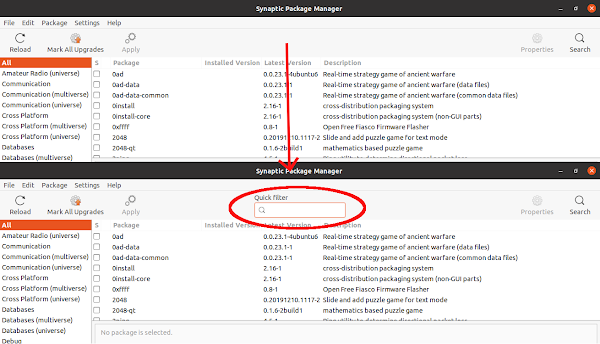
Fix - quick search box not visible in synaptic package manager.
Image
Problem I like to install software using synaptic package manager rather than using Ubuntu software center or using gnome software center . Recently I have noticed that the quick search or filter box is disapeared from the top bar of the synaptic package manager. I this post I will discuss how to get the quick filter box back. Solution The quick serch box is provided by the package apt-xapian-index , and it does not installed by default with synaptic since it is in the recomended dependency list. So to solve the problem, we just have to installed the package and rebuld the search index. To install the package, run the following command in terminal sudo apt install apt-xapian-index After installing the package, we have to rebuild the search index, which we can do by running the following command in the terminal. sudo update-apt-xapian-index -vf Now if you lunch the Synaptic Package Manager , we can see that the quick search box is there, and if we type anyth...

Installing SciDaVis on Ubuntu 20.04

Image
SciDaVis is a free and open source application to visualize and analyze scientific data. This is kind of clone to the proprietary and commercial applications like Origin and Igor pro. This application can generate 2D and 3D plot and perform functions like curve fitting or Fourier transform. Problem The application is not available in the Ubuntu software center, so we can not directly install from Ubuntu repository. Solution: The latest version of the application is available on the GitHub, you can see it here. The easiest way to install the application is by using the prebuilt binary package. You can either download the deb file or install by adding the repo. I prefer the later because it will automatically update the application using the Ubuntu software update. The instruction can be found here. Go to the link, select Ubuntu and select Add Repository and Install Manually. Following are the command to install int in Ubuntu 20.04. sudo sh -c "echo 'd...

Using shell script to install multiple software at a time

Installing Linux os like Ubuntu is very easy. But the problem starts when we lost all the already installed software. We install lots of software. Problem starts when we start to re-install all the required software. We can create a list of software and re-install them as stated in the previous blog post . But the problem is if we want to install third party software which need to add repo. So I have found out another solution, in which I have created a bash shell which contain all the command including the adding repo commands. I have given a simple example bellow: #!/bin/bash apt-get install -y gnuplot wxmaxima qtoctave qtiplot  add-apt-repository -y ppa:ubuntu-wine/ppa  add-apt-repository -y ppa:tualatrix/ppa  apt-get updateapt-get install -y wine ubuntu-tweak Save the file with any name and .sh extension (eg. install_software.sh). Then make the file exicutable by running the following command in the directory that contain the file. sudo chmod a+x i...

Vim Keyboard Shortcuts

General Nearly all commands can be preceded by a number for a repeat count. eg.  5dd  delete 5 lines  gets you out of any mode and back to command mode Commands preceded by  :  are executed on the command line at the bottom of the screen :help  help with any command Navigation Cursor movement: ← h  ↓ j  ↑ k  l→ By words: w  next word (by punctuation);  W  next word (by spaces) b  back word (by punctuation);  B  back word (by spaces) e  end word (by punctuation);  E  end word (by spaces) By line: 0  start of line;  ^  first non-whitespace $  end of line By paragraph: {  previous blank line;  }  next blank line By file: gg  start of file;  G  end of file 123G  go to specific line number By marker: mx  set mark  x ;  'x  go to mark  x '.  go to position of last edit ' '  go bac...

Installing SSH Server

Image
Secure Shell (SSH) is a network protocol to secure data communication between two computer connected via network. You can access remote shell, execute command. Also using Secure file transfer protocol (sftp) you can transfer data from one computer to another. For this you need one ssh server software and one ssh client. If you are using linux then you are probably aware about that ssh client is, by default, installed. For windows user, there are lots of ssh client software for windows, you can download them and install on your computer. For example, you can use this software link, SSH Secure Shell or PuTTY .   You can install ssh server very easily in Ubuntu. Just search for "openssh-server" or "ssh server" in your package manager and install it. Also form terminal you can run the command sudo apt-get install openssh-server . Now you can access your computer remotely and securely. Installing ssh server in windows xp is also very easy. For windows xp there is a very ...

How to view ext-4 file system on windows 7

Ext-4 (fourth extended filesystem) is the default file system of the modern linux distro. And NTFS (New Technology File System) is the default file system for windows system now. If you format your disk you can view the files on linux because linux support both file system. But you can’t open ext 4 (or any ext version ) formatted file system with windows. Fortunately there are some driver which can be used to access ext 4 file system on windows. ext2fsd is one of the best of them. I have used it and it is working fine. It does not support ext4 natively.So first download and install the ext2fsd from here and install it. Now download the patch from here and extract the zip file. There is read me file, follow the instruction given in the read me file and you can read the ext4 file system from windows now. You have both option either you can mount the filesystem on read only mode or read write mode. cheers APaul

Enhance your Ubuntu experience

Image
Ubuntu is one of the most popular Linux distro now. This is really simple to use and at the same time highly customizable. There is a very strong community support behind you. Lots of theme and software to use with it. Still you some time fill bad. Here I am telling some trick to enhance your experience. Menu: Ubuntu menu is one of the thing that most of the people don't like. And there are lots of menu to use like gnome main menu, gno menu and so on. But the menu that I like most is cardapio menu. It is very much like windows menu. Check some screen shots here . It has native gtk interface. There are lots of plugin. You can search file, application from the menu window. You can even do google and wikipedia search right from the menu window. To install it add the ppa ppa:cardapio-team/unstable (how to add ppa? see other blog). And then you can install it directly from the package manager. Avant Windows Nevigator: Avant Window Nevigator (AWN) is a dock bar for linux. This i...

Installing Microsoft core font

In linux if you want to view document created by MS office as it exactly it should look like you have to install Microsoft core font. This font was first hosted by Microsoft in there website and any one can get it for free and can re distribute it. But now they have removed it but you can get it lot of third party software. In ubuntu you can install it from ttf-mscorefonts-installer using this command sudo apt-get install ttf-mscorefonts-installer But there is some bug with it which will stop it in middle and you will face same kind of problem as people faced trying to install flash plugin in Ubuntu. I guess this problem happens for those who are working under proxy. After this problem appear you can cancel installation and restart your computer. And then run this command in terminal. sudo dpkg --configure -a Still you will see some error massage as before. Wait for some time. Then cancel it using ctrl+c and then run the command sudo dpkg-reconfigure ttf-mscorefonts-installer ...

Howto Recover Grub2 After Windows Installation

There are many people who use dual booting and use two operating system together. Specially Linux and Windows. Most of the Linux user use Ubuntu. Ubuntu is very easy to use with very good interface. For dual booting with Ubuntu there is grubloader which loaded first and give you option which operating system you want to use. But some time you may destroy your grubloader. This generally happen when you repair your Windows os or reinstall the Window. In that case  You have to repair your grubloader again to get back your grubloader.

Flash Plugin installing problem in Ubuntu

Image
Flash plugin is one of the very important plugin of Internet Browser. To watch most of the online video (like YouTube video) and animated picture we need it. But there is a problem installing this plugin in Ubuntu, if you are working inside proxy. If you try to install it from synaptic package manager,  if you want to install it from .deb file or if you install from direct command. The package downloaded fine but when dpkg runs it shows problem. The only way it can be install seems to be in terminal with Ubuntu Restricted Extras. The code is as following: sudo apt-get install ubuntu-restricted-extra But the worst thing happen when if try to install it and it stop installing. After that you can't open senaptic package manager, you can't open update manager, you can't install or uninstall any software in your system terminal and even you can't run the .deb file. It will always show some error massage. Like " run sudo dpkg --configure -a" or  "first r...

Howto Recover Grub2 After Windows Installation

There are many people who use dual booting and use two operating system together. Specially Linux and Windows. Most of the Linux user use Ubuntu. Ubuntu is very easy to use with very good interface. For dual booting with Ubuntu there is grubloader which loaded first and give you option which operating system you want to use. But some time you may destroy your grubloader. This generally happen when you repair your Windows os or reinstall the Window. In that case  You have to repair your grubloader again to get back your grubloader.

Problem With Installing Real Player in Ubuntu 9.10

I have tried to install Real Player in Ubuntu 9.10. I found a package in Real site and downloaded the .deb file as I will install it in Ubuntu. When I install the player, the installation process goes smoothly. But the problem is that when I was trying to play any kind of media it is showing that the player is not able to play back the media.