Posts

Showing posts with the label Linux mint

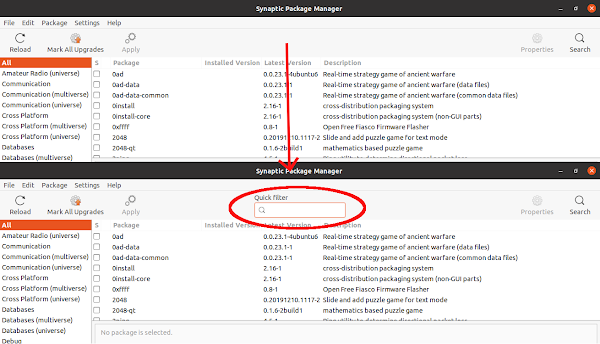
Fix - quick search box not visible in synaptic package manager.
Image
Problem I like to install software using synaptic package manager rather than using Ubuntu software center or using gnome software center . Recently I have noticed that the quick search or filter box is disapeared from the top bar of the synaptic package manager. I this post I will discuss how to get the quick filter box back. Solution The quick serch box is provided by the package apt-xapian-index , and it does not installed by default with synaptic since it is in the recomended dependency list. So to solve the problem, we just have to installed the package and rebuld the search index. To install the package, run the following command in terminal sudo apt install apt-xapian-index After installing the package, we have to rebuild the search index, which we can do by running the following command in the terminal. sudo update-apt-xapian-index -vf Now if you lunch the Synaptic Package Manager , we can see that the quick search box is there, and if we type anyth...

Using shell script to install multiple software at a time

Installing Linux os like Ubuntu is very easy. But the problem starts when we lost all the already installed software. We install lots of software. Problem starts when we start to re-install all the required software. We can create a list of software and re-install them as stated in the previous blog post . But the problem is if we want to install third party software which need to add repo. So I have found out another solution, in which I have created a bash shell which contain all the command including the adding repo commands. I have given a simple example bellow: #!/bin/bash apt-get install -y gnuplot wxmaxima qtoctave qtiplot  add-apt-repository -y ppa:ubuntu-wine/ppa  add-apt-repository -y ppa:tualatrix/ppa  apt-get updateapt-get install -y wine ubuntu-tweak Save the file with any name and .sh extension (eg. install_software.sh). Then make the file exicutable by running the following command in the directory that contain the file. sudo chmod a+x i...

Installing ibus avro in linux mint 15

Image
Error message showed during ibus-avro installation Today I installed Linux Mint 15 in my desktop. While I was adding repo for ibus-avro-quantual with the following command sudo add-apt-repository "deb http://download.opensuse.org/repositories/home:/sarimkhan/xUbuntu_13.04/ ./" I was getting following error message. Cannot add PPA: 'No JSON object could be decoded'. I solved the problem by coping the entry of the repository from the source.list of the Ubuntu 13.04. The entries are listed here so just use the following command in linux mint to install ibus-avro-auantual. sudo gedt /etc/apt/source.list and the paste the following line at the end of the file. deb http://download.opensuse.org/repositories/home:/sarimkhan/xUbuntu_13.04/ ./ # deb-src http://download.opensuse.org/repositories/home:/sarimkhan/xUbuntu_13.04/ ./ Then save the file. Now update the database using sudo apt-get update command and then install the ibus-avro using sudo ap...