Posts

Showing posts with the label EmailClient

Send in Email in Background in Thunderbird
Image
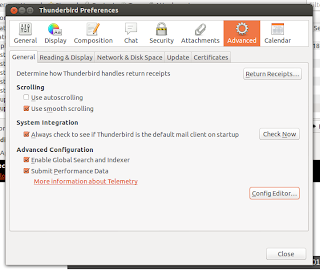
Mozilla Thunderbird is one of the best email client available for Windows, Linux and Mac. Here I will tell how to send email in background in Thunderbird, so that when you send any mail that irritating "sending email" popup will not come out in front of you. First go to Preferences window: In windows: tools>options In linux: Edit>preferences Now go to Advance tab > General   and click on Config Editor Button, When asked click on I'll be careful, I promise button.  Then search for mailnews.sendinBackground and then select it. Then right click and toggle it to true. Now Thunderbird should send your email in background. You may need to restart the Thunderbird. Cheers A.Paul

POP and SMTP setting to access Gmail and YahooMail for desktop email client

Image
Gmail and YahooMail are two most popular web based email (web mail) provider. Though this two provider provide lots of functionality for viewing, composing and storing mail which are really cool, but some time we need some desktop client. The good news is that we can get mail from this web based mail to our desktop email client. Here I am saying how to configure your email client to get this email. There are two protocol supported by Gmail, viz IMAP and POP only POP by YahooMail to get the email and SMTP to send email. Where IMAP is a two way synchronizing process, POP is one way process. But IMAP is little slow and POP is relatively faster. Here I will explain how to configure POP not IMAP which I will tell later.

Configuring Mozilla Thunderbird

Image
Mozilla Thunderbird is a cross platform desktop email client which support both IMAP and POP protocol. This is a free open-source software. You can install the English version of software from this site,  http://www.mozillamessaging.com/en-US/thunderbird/ . There are other language version also. Actually I have four email account in different provider, like Gmail, Yahoo and my Departmental email. So to check all email I have to open the different account.  Which is very boring and time consuming. So I use Desktop email client and check all mail together. Why I have chosen Mozilla thunder bird? There are other client like Outlook in window and Evolution Mail in Ubuntu (which is actually default client in Ubuntu). Actually I feel that the interface of TB is more easy and attracting Outlook and Evolution Mail. More easy to configure and most interesting is that its selection the conversation in conversation view is better than other two rival. It's a product from Mozilla so t...