Send in Email in Background in Thunderbird
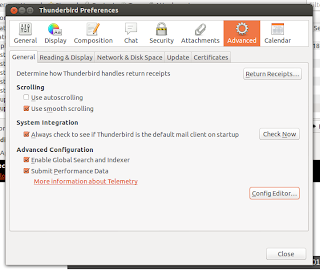
Mozilla Thunderbird is one of the best email client available for Windows, Linux and Mac. Here I will tell how to send email in background in Thunderbird, so that when you send any mail that irritating "sending email" popup will not come out in front of you. First go to Preferences window: In windows: tools>options In linux: Edit>preferences Now go to Advance tab > General and click on Config Editor Button, When asked click on I'll be careful, I promise button. Then search for mailnews.sendinBackground and then select it. Then right click and toggle it to true. Now Thunderbird should send your email in background. You may need to restart the Thunderbird. Cheers A.Paul